Company Insights

Who can use this feature?

Company Insights provides an overview of “Your Competitive Score”, “Market Insights” and “Listings Insights”.
You can view your Company Insights by going to GP Expert > GP Insights > Overview.
What is covered?
Company Insights
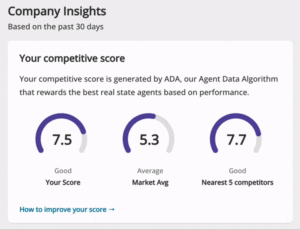
The Competitive Score is a scoring mechanism that will help you find out where you stand compared to your competitors within the same area/community.
This “Competitive Score” is calculated based on the following 4 factors:
| Average Quality Score of your listings. | |
| The percentage of your listings that are Verified. | |
| The total volume of leads your business has generated. | |
| The total number of published listings your business has had on Property Finder within a specific community. |
Tip: Keep in mind that the dashboard is updated once per day, and presents data of the past 30 days by default.
Locations and CategoriesYou can filter the page to show details for a specific location. |
 |
Company InsightsThe score is out of 10. |
 |
Market Insights
Shows your position compared to your competitors in terms of leads generated.
Company Performance
“Listings” shows the breakdown of your listings by product type (Standard, Featured, and Premium).
“Impressions” shows how many times your listings reflected on the Search Pages during the past 30 days.
“Clicks” shows how many users clicked on your listings to view more information.
Quality Score
“Quality Score” shows the average quality score of your listing compared to your nearest 5 competitors and the market average (right above you).
“Verified Listings” refers to the average percentage of verified listings compared to your listing compared to your nearest 5 competitors and the market average (right above you).
Listings Insights
1. “Communities” section shows the high and low performing 5 (Communities) in terms of leads generated.
2. “Properties” section refers to the high and low performing 5 (Properties) in terms of leads generated.
Note: The number of Leads represented here includes “Email”, “Call” and “WhatsApp” Clicks.
3. “Your Credits Usage” represents a breakdown of the credits utilized on each listing type.
Recently viewed articles
Related articles
No Related Articles Found.