Can I assign a lead to more than one Agent?

There would be few scenarios when a Agent would go on a vacation and as a Manager or Admin, you would want to assign a second Agent for all the Agent 1’s Leads.
PropSpace allows you to add upto 4 Agents to a Lead. You can do so by following the steps below:
1. Selecting the Lead that you want to assign to agent 2,
2. Go to Edit Lead,
3. On the Agent 1 field, select the “+” sign (next to Agent 1)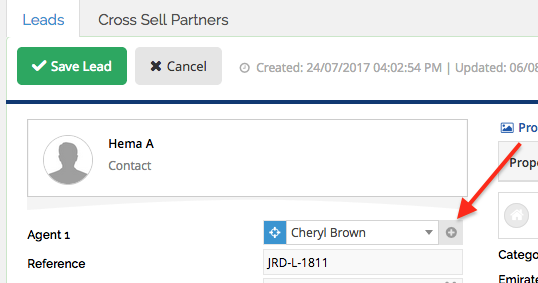
4. As you select the “+” sign, a pop up box appears, where you can select the Agent 2 and assign this Lead to second agent.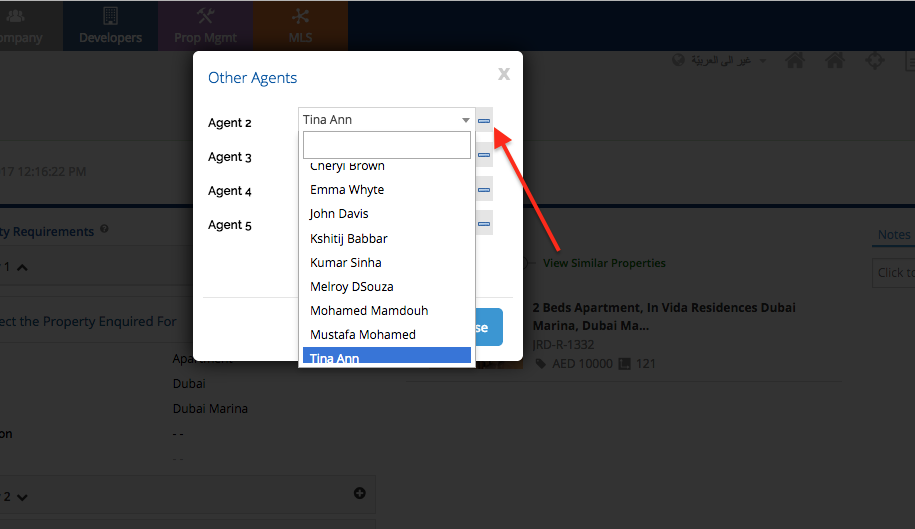
5. Select “Save & Close” and then “Save” the Lead.
By the following the above steps you should be able to assign a Lead to more than 1 Agents.
Next: If you’ve not seen it yet. How to: Add a Lead
Recently viewed articles
Related articles
No Related Articles Found.