How to import my contact list when sending a bulk SMS?

1. Navigate to ‘Marketing’ then select ‘SMS’.
2. Click on the ‘Bulk SMS’ tab and enter your SMS message. In the ‘Select Option’ section, there is a dropdown where you can select the source of your contacts, Select ‘Import from an Excel File’ then click the ‘Upload File’ button.
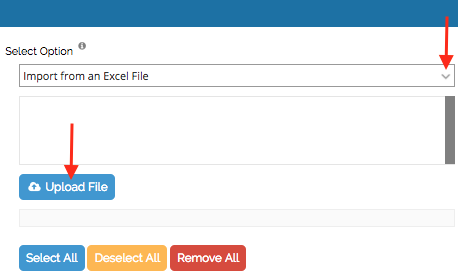
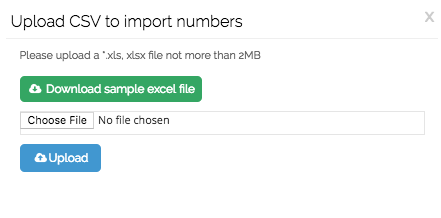
3. It will direct you to a small dialogue box where you can upload your excel file. Click ‘Choose File’ to browse, then after selecting your file, click the ‘Upload’ button. Note that the size of the file should only be 2 MB and in .xls, xlsx, csv format only.
4. The uploaded contacts will now be imported and displayed on the ‘Select Option’ section. Click the ‘Select All’ button to select all the mobile numbers then click ‘Send Message’.
Recently viewed articles
Related articles
No Related Articles Found.