How to select a user color in the Calendar?

Any color can be selected for a user on the calendar, allowing admins and managers to distinguish between the users.
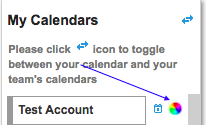
To set a color, navigate to Calendar screen under Work and click the color selector icon on the right of the user name and select the desired color.
Recently viewed articles
Related articles
No Related Articles Found.