Can I add a video to my listing?

You can either add a YouTube link or upload a video file to your listing. The video can be viewed in the Listing Preview page and on property portals that support videos.
To add a video to a listing, do the following steps:
1. Navigate to the listings screen
2. Select the relevant listing record from the data table, and click on the Edit Listing button.
3. Switch to the Other Media tab.
4. Copy and paste the YouTube URL to the YouTube Video Link field. Alternatively, select an MP4 video (less than 10 MB in file size) to upload in the Upload Video field.

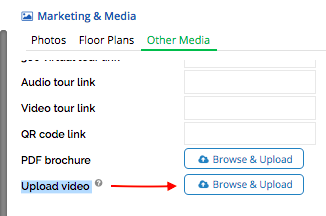
5. Click on Save when done with the changes
Recently viewed articles
Related articles
No Related Articles Found.