WhatsApp Insights

What is covered?
- WhatsApp Insights
- How Does WhatsApp Insights Work
- Frequently Asked Questions
- Frequently Asked Questions
WhatsApp Insights
WhatsApp Insights provides you with the following information
How many leads have you received via WhatsApp
If you have responded to those leads or not
How fast you responded to those lead
Tip: WhatsApp Insights, makes becoming a SuperAgent easier, as SuperAgent takes into consideration your overall response rate (which includes WhatsApp and Calls).
How Does WhatsApp Insights Work
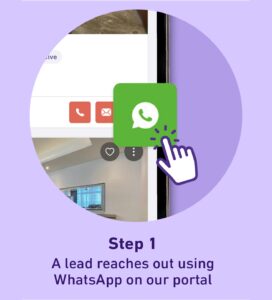
The home seeker uses WhatsApp to communicate with you from our website.
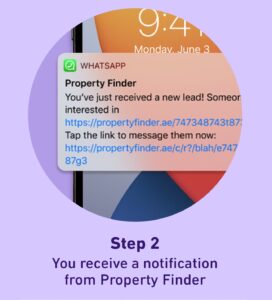
A WhatsApp message from Property Finder will be sent to the agent with the home seeker’s message.
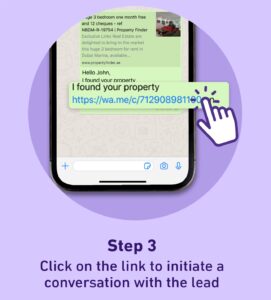
The agent clicks on the link to start the conversation with the home seeker.
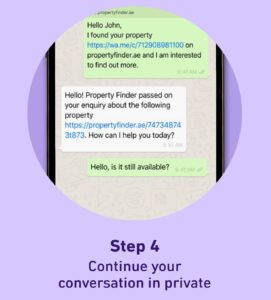
The agent continues the conversation with the home seeker.
Frequently Asked Questions
Frequently Asked Questions
You will be asked to choose between starting a message or going to your personal WhatsApp.
You should select “Message” which will start a conversation with the lead using our pre-populated text in WhatsApp Business. If you select “WhatsApp”, it will redirect you to your personal app.
Yes, however, SuperAgent takes into consideration your overall response rate (which includes WhatsApp).
If you choose not to have WhatsApp Insights activated, we will have no way of calculating your WhatsApp responses and their times, which will make it harder for you to achieve the SuperAgent status.
No. when you click to respond to a property seeker it will open a private WhatsApp message between you and them.
We distinguish between working hours and non-working hours to not affect your response times negatively
You can see all your WhatsApp Leads in GP Expert > Leads > WhatsApp
In that case, we recommend using WhatsApp Enterprise instead, find more about WhatsApp Enterprise.
Recently viewed articles
No Recently viewed Articles Found.
Related articles
No Related Articles Found.