WhatsApp Leads

What is covered?
- WhatsApp Message Status
- Filtering WhatsApp Leads
- Frequently Asked Questions
- Frequently Asked Questions
WhatsApp Message Status
When a property seeker sends a WhatsApp message to your agent’s WhatsApp number, a lead is created for you in GP Expert showing the status of the WhatsApp message.
Here are the different statuses that you can see:
Not Delivered: The message from the property seeker was not delivered to the assigned agent.
Waiting: The message is in the queue and waiting to be delivered to the assigned agent.
Delivered: The message has been received by the assigned agent
Note: If the message stays on “Waiting” or “Not Delivered”, contact GP Support to resolve the issue.
Filtering WhatsApp Leads
You can filter your WhatsApp leads to help you find a lead quicker.
In the below example, we are filtering all leads by listing reference “gpflex-3691427”.
You can also filter WhatsApp leads using the below filters:
Property Seeker’s WhatsApp Number
Message Status
Date of the Message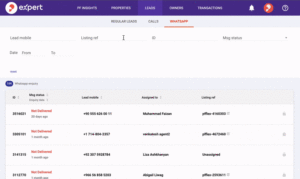
Tip: If you wish to remove all filters, click “Reset”.
Frequently Asked Questions
Frequently Asked Questions
Yes. You can check Leads Insights to view how you are performing in terms of Calls, Emails, and WhatsApp Leads.
The message will show “Waiting” until it is sent out from our servers to your number.
If the message continues to show “Waiting” even after you receive it on your number, please contact GP Support to resolve the issue
“Not Delivered” means that we are sending the message to your number, but are not receiving confirmation that you received it.
Double-check that you have an internet connection and that your WhatsApp number is active.
If the message still says “Not Delivered” please contact GP Support to resolve the issue.
Recently viewed articles
Related articles
No Related Articles Found.